Bài đăng

SPO600 - Lab 3: 6502 Program Lab: Inches to Feet Converter

Hình ảnh
 In this lab, I used the 6502 assembly language to build a simple inches-to-foot converter. This project allowed me to experiment with arithmetic operations, keyboard input handling, and direct screen output without relying on ROM routines. This hands-on experience also helped me prepare for more advanced assembly languages like x86_64 and AArch64. Resources During the lab, I used a variety of resources, including: 6502 documentation provides detailed information about the 6502 architecture and instruction set. 6502 Emulator: For testing and debugging code. 6502 Math and Procedures: A reference book for arithmetic operations and control flow. Sample code demonstrates graphical output and keyboard input handling. Project Concept My project is a simple calculator that converts a specified number of inches to feet. In this program, the user enters an inch number, and when they press Enter, the program calculates and displays the corresponding number of feet. This simple conversion nec...

SP600 - Lab 2: 6502 Math Lab

Hình ảnh
In this post, I'll go into the world of 6502 assembly language, which is one of the most fundamental low-level languages in computing. This lab focusses on using assembly to control the movement of a simple graphic on a bitmapped display, simulating basic animation with a set of programmed instructions. The goal of this lab is to create a graphic that moves across the screen and "bounces" off the edges, changing direction whenever it encounters a boundary. As part of the lab, I used the 6502 emulator to write and test the assembly code, as well as experiment with various movement increments and behaviours. This project provides an introduction to low-level programming concepts that are required for understanding more complex architectures such as x86_64 and AArch64. Set Up 1. I haved open the 6502 Emulator. Initial Code 2. Then copied and pasted for the code  ; ; draw-image-subroutine.6502 ; ; This is a routine that can place an arbitrary ; rectangular image on to the sc...

SPO600 - LAB 1: 6502 - Assembly Language Lab (Part 2) and Reflection

Hình ảnh
This blog discusses my experience with the 6502 assembly language through a series of experiments aimed at manipulating a bitmap display. In this lab, I investigated the effects of various assembly instructions on screen output, focussing on how shifting and incrementing values alter the colours displayed. I also completed additional challenges such as changing specific pixels to different colours and drawing lines around the screen's edge. Experiment 1. Add tya Before sta ($40),y The first experiment involves placing the tya instruction before the sta ($40),y. This transfers the value from the Y register to the A register, which determines the colour used to fill the screen. 2,  For each pixel, iny increments the Y register, and with tya, the value in the Y register is copied into the A register. The A register controls the pixel colour in the sta ($40),y instruction, so the screen is filled with colours based on the value of Y. This means that the colour of each pixel is directly...

SPO600 - LAB 1: 6502 - Assembly Language Lab (Part 1)

Hình ảnh
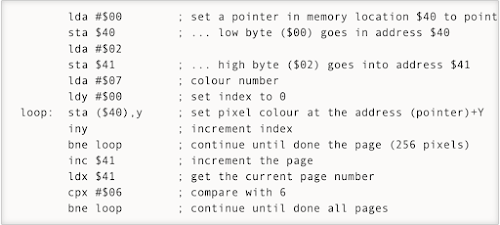
In this lab 1,  I have learnt basic 6502 assembly language and used an emulator to manipulate a bitmap display. I learnt how to calculate program execution time, optimize performance, and change code to achieve various visual effects. Bitmap Code In this step, I configure the emulator and run the initial code, which fills the screen with yellow pixels. 2. I copied and pasted the following assembly code into the 6502 Emulator : 3. Then I pressed the "Assemble" button and "Run" to assemble and execute the code, which successfully filled the screen with yellow pixels. - The code fills the bitmapped display with yellow by storing the yellow colour code (#07) at sequential memory addresses that correspond to pixels. - It employs indirect indexed addressing (sta ($40),y). with memory locations $40 and $41 pointing to the beginning of the display memory ($0200). - The iny instruction raises the index, looping through each pixel in a page, while bne keeps the loop running ...